
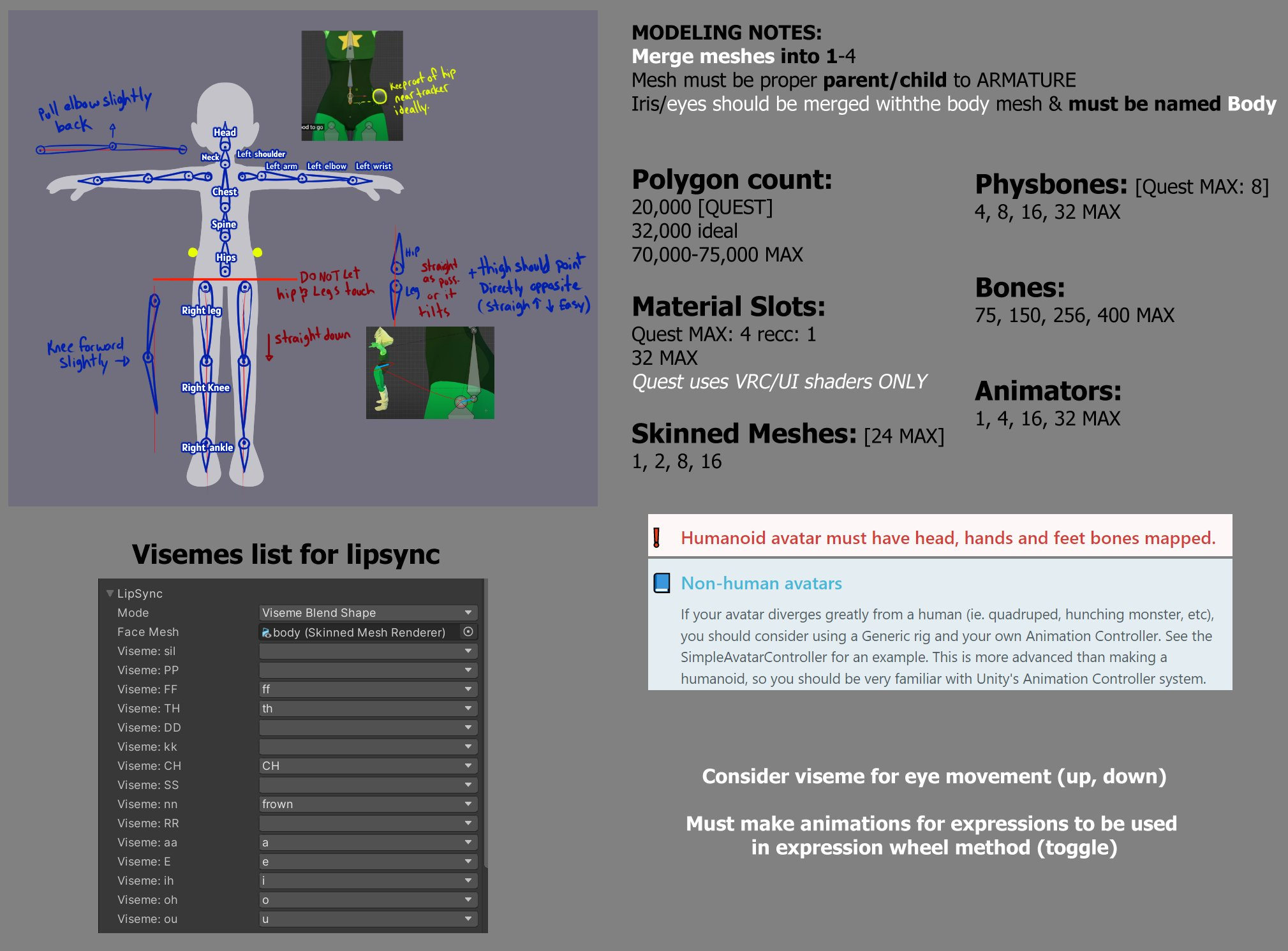
VRChat Cheat Sheet for Artists
Product Description
I made this cheat sheet for myself in 2022 as notes to try and sort out what I needed to know to make avatars on my own. (So details may have changed)
I used to model for MikuMiku Dance so that's where my starting point and frame of reference is.
"Mesh must be named Body" is a lie. That's ONLY if you plan on using blender's CATS Plugin. I do not. I don't know if it's still being updated. I prefer to make my own stuff manually usually bc I'm nit-picky tho.
"Consider Visemes for Eye Movement (up/down)" is also a lie and optional. Only really good if you want to make it a toggleable pose while in-game. But you can make eye shapes FOR when th eyes are looking up or down. (Open eyelid slightly for eye looking up, close eyelid slightly for eye looking down.) For more natural and lively eye tracking or movement.
Material Slots
For MMDers: Do NOT separate your mesh by materials for selection making, or masking. You can use texture masks for that. You want as few materials as possible. Combine your textures into as few images as you can. You do not need a head, body, outfit, eye and hair material. You'll nuke the avatar into "Very Poor" (which is mostly standard for PC users but hey. If you can get it to Medium that's pretty damn good IMO, I'm all about optimization) Fewer materials = very nice
Physbones
For MMDers: it's physics/joints
Wiggly bits the fewer components the better, for best optimization(?), make a "root" bone parent to put one physbone component onto, instead of putting one on each individual bone.
(So for hair, just make a "base hair" bone that's a child of the head bone, and then make the actual moving hair bone parts a child of that. Then in unity you can tell the base bone to have the component, but not to wiggle it.
Visemes
For MMDers: we call them Facial Morphs/Facials
Create the usual MMD facial morphs, as "MMD Worlds" will use them just like in MMD. The motion data usually retains the lipsync and expressions.
Armature
For MMDers: The spine should go UP from the hips, there is no "lower body" bone that points down and upper body bone that points up. (Twist bones are also handy if you are familiar with them.) You do not NEED a Motherbone / Groove bone. Nor do you need to set up IKs, Unity/VRChat will handle the creation upon upload.
Adding a jaw bone will save you a little bit of ttrouble for Unity's Auto-detection of humanoid rigs. Otherwise it usually plonks a child of the head bone into the "jaw" and 98% of the time, it's the bangs/hair bone.
Look up the Standard Humanoid rig for Unity and copy the naming conventions. Then Unity will help identify what's what and spare you having to correct a LOT of things. You still prob have to re-identify a bone or two.