VoiceConstraint | Move Your Voice!【ModularAvatar】
Product Description
Easily move your Avatar's 'Voice' around with VoiceConstraint! A versatile system to control where others perceive where your voice is coming from!
VoiceConstraint is an easy-to-add NDMF (Modular Avatar) install script that will move your Avatar's 'Voice' to a desired transform on a toggle!
Features:
・Moves your Avatar's 'Voice' to a desired location on a toggle!
・Use 'Existing Parameter' section to integrate with other prefabs easily!
・Two Constraint Type options available (Toggle, Between) with more to come!
・Support for having multiple prefab instances on a single avatar, so assets that use VoiceConstraint should be compatible with one another!
・Quest Compatible!
Installation:
[Dependencies]
・Modular Avatar: https://modular-avatar.nadena.dev/ [Version 1.10.0 or Newer]
・・Non-Destructive Modular Framework [Version 1.9.0 or Newer]
1. Make sure you have Modular Avatar and Non-Destructive Modular Framework installed. (NDMF installs with Modular Avatar through the Creator Companion.)
2. Import VoiceConstraint.unitypackage into your project.
3. Navigate to 'OrendCreations/VoiceConstraint' within your project. Drag-and-Drop the VoiceConstraint prefab onto your avatar.
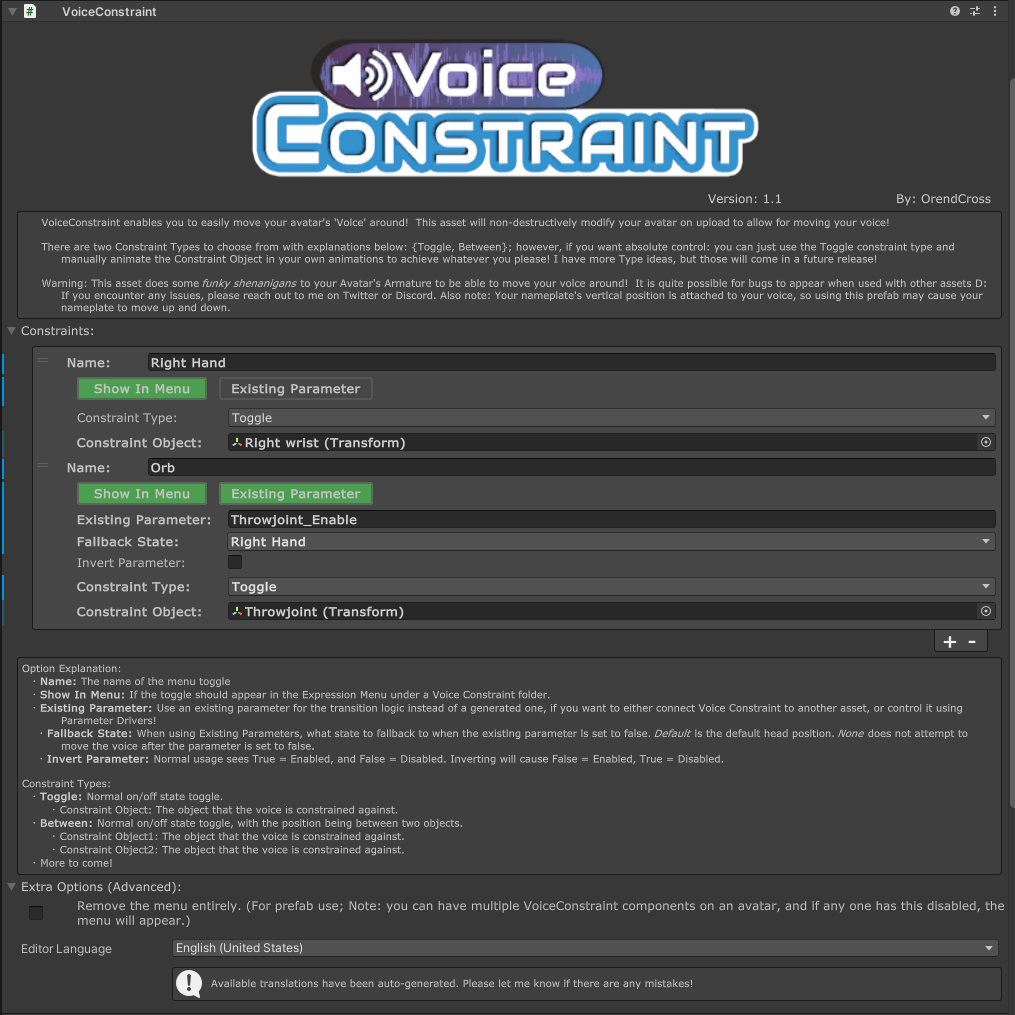
4. Add a Constraint to the list of constraints, and explore the options!
Option Explanation:
・Name: The name of the menu toggle.
・Show In Menu: If the toggle should appear in the Expression Menu in the Voice Constraint folder.
・Existing Parameter: Use an Existing Parameter to drive the Voice Constraint transition logic. Useful if you want to connect VoiceConstraint to an existing prefab, or want it to automatically enable when a certain toggle is on!
・Fallback State: When using Existing Parameters, what state to fallback to when the parameter is set to false. Default is the default head position. None does not attempt to move the voice when the parameter is set to false.
・Invert Parameter: Normal usage sees the Existing Parameter as True = Enabled, and False = Disabled. Inverting will invert this logic.
Constraint Types:
・Toggle: Normal on/off state toggle to a single Transform.
・Constraint Object: The object that the voice is constrained against.
・Between: Normal on/off state toggle between two Transforms.
・Constraint Object1: The object that the voice is constrained against.
・Constraint Object2: The object that the voice is constrained against.
・More to come!
Limitations:
・This asset does some odd things to your Avatar's Armature to be able to move the Voice around. It is possible other assets and addons may not work well with this! If you notice any bugs, please reach out to me on Discord or Twitter!
・This asset functions by moving your Avatar's Head Bone. Your nameplate's vertical position is also attached to your Head Bone, so using this asset may move your nameplate around!
・While moving your voice has been possible for a long time, it is an unintended feature, and may possibly break in the future D: If you want to read more about how it works, the VRChat Wiki has a good explanation on it.
・Additive Bone Transformations parented to the head cause issues with VoiceConstraint. As a work around, those transforms get duplicated and constrained. If the transforms are part of a physbone chain, the entire chain gets duplicated. This will increase your constraint count by a bit. In addition, when the head is moved, any physbone chains that are affected will jolt around (This is better than the alternative I promise).
Planned Additions:
・Look-At Constraint so the direction of the voice faces a specified transform
・Random Option to select a random transform from a list
Terms of Use:
( Personal Product License )
By purchasing and using this product, you are agreeing to the terms of service outlined here:
・You may not share, redistribute, or resell this product in any form.
・This product is a digital asset, no refunds will be granted under any circumstance.
・I am not responsible for any damage caused by using this product.
・You may upload private, public, and commissioned avatars using this product.
( Commercial Product License )
This commercial product license relates to including this product and its files within your own product, to be sold for profit. (Examples: assets that wish to rely on this product, paid avatars, included within avatar bases, etc.)
By purchasing and using this product, you are agreeing to the Commercial Product License Agreement outlined here:
・You may include the Commercial Product License version of this product within your own products for profit, given these terms are followed.
・You may not share, redistribute, or resell this product as-is.
・Your product must not be priced lower than the Original / Personal License version of this product.
・You must credit and include the link to this product on your product's page.
・You must not alter the creation of the credit information that is generated within this product's submenu.
・This product is a digital asset, no refunds will be granted under any circumstance.
・I am not responsible for any damages caused by using this product.
If you are unsure if your usage of this product does not align with these Terms of Use, please reach out to me via Twitter or Discord: @Orendcross | https://discord.gg/sAnekxwd3x
Update information:
- 2026/02/14 - v1.0
・Initial Release! - 2026/02/15 - v1.01
・Hotfix to support asset paths on Linux - 2026/02/16 - v1.02
・Fixed eyes being still when not using FaceTracking! Whoops! - 2026/02/18 - v1.03
・Added HeadChop compatibility mode toggle, to avoid stacking HeadChop components on the head bone for assets such as AvatarPoseSystem - 2026/02/23 - v1.1
・No longer save VoiceConstraint parameter on avatar loads. Causing issues with Prefabs that hide the menu (VoiceMuffler) when users change avatar while constraint is active. Eventually I will bring this back as a feature, for those who want to permanently move their voice.
・If only 1 VoiceConstraint Transform exist, sync as a Bool instead of a Int. - 2026/02/24 - v1.1.01
・Fixed eyes not being correctly duplicated when the FBX Eye Bones and VRCAvatarDescriptor EyeLook Bones do not match. - 2026/03/02 - v1.1.02
・Resolved the niche Additive Bone Transformation issues. This was only affecting avatars that use bone transformations animations in additive layers that were parented on the head bone, such as the Spiri'Avali. Now if Additive Bone Transformations on the head are found, they get duplicated and constrained. If they are part of a Physbone chain, the whole Physbone chain is duplicated. Note, this will increase your constraint count by a bit. In addition, when the head is moved, any physbone chains that are affected will jolt around (This is better than the alternative I promise). - 2026/05/01 - v1.1.03
・Slight modification to the niche Additive Bone Transformation issue. Should be more reliable now!