
Product Description
Advanced Creative Flight 🪽
A complete creative flying system for VRChat worlds
Advanced Creative Flight is a powerful, highly customizable flight system made for VRChat world creators who want more than a simple fly toggle. It gives your world a full creative-flight experience with Desktop and VR support, permissions, profiles, zones, stamina, FX, NoClip Assist, and a clean Parrot’s Conch style editor.
Whether you want admin-only flight, VIP flying areas, creative building zones, blocked areas, speed modifiers, or special flight rules per zone, this system is designed to give you full control. 🚀
What is this asset? 🛠️
This is a drag-and-drop creative flight system for VRChat worlds.
It allows players to fly using configurable controls, while giving the world creator full control over:
- Who can fly.
- Where players can fly.
- How fast they can fly.
- What happens when they enter or leave special zones.
- Which profile/rules are applied in each area.
- Whether stamina, FX, NoClip Assist, and debug tools are enabled.
It is perfect for creator worlds, sandbox worlds, staff tools, VIP areas, build/test worlds, flying islands, exploration maps, private worlds, or any place where controlled flight can improve the experience. 🧩
How to set it up 📦
Setup is very simple.
Just drag and drop the prefab into your scene:
Assets/ParrotsConch/Prefabs/AdvancedCreativeFlight.prefab
That’s it.
The system is ready to use after placing the prefab in your world. ✨
From there, you can open the inspector and customize everything using the included Parrot’s Conch style editor.
Desktop and VR flight support 🎮🥽
Advanced Creative Flight supports both Desktop and VR players.
Desktop
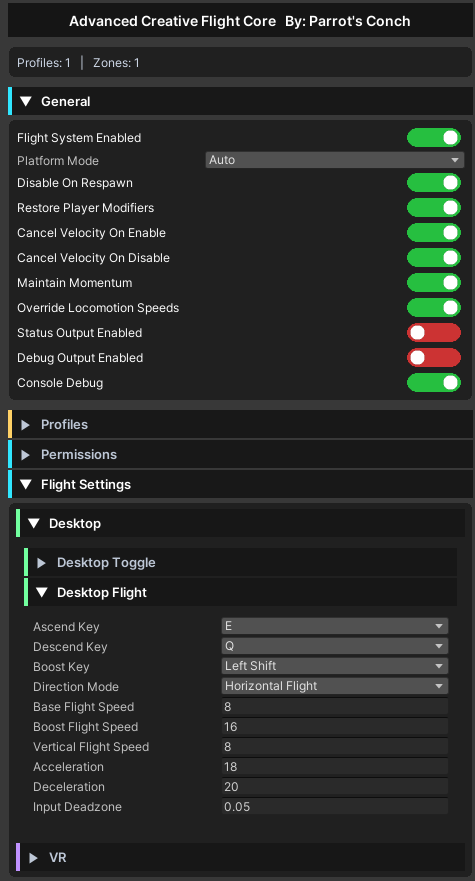
Desktop players can use configurable creative-style flight controls:
- Double jump to toggle flight.
- Configurable ascend key.
- Configurable descend key.
- Configurable boost key.
- Horizontal flight mode.
- Camera-direction flight mode.
- Optional momentum behavior.
You can choose whether Desktop players fly using horizontal movement or fly toward the camera direction.
VR
VR players can fly using a more comfortable VR-friendly system:
- Double Jump input to toggle flight.
- Fly toward head direction.
- Optional comfort settings.
- Configurable boost input.
- VR movement settings.
- Optional particle and audio feedback.
The system is made so VR users can control flight naturally without needing complicated setup.
Profiles system 🧬
Profiles are reusable flight rule presets.
A profile can store special settings such as:
- Flight speed.
- Boost speed.
- Vertical speed.
- Energy/stamina rules.
- Permission rules.
- VR comfort options.
- Audio and particle settings.
Profiles are useful when you want different flight behaviors in different parts of your world.
Example uses:
- Admin Profile: fast flight, no stamina limits.
- VIP Profile: higher speed and special FX.
- Comfort Profile: slower VR-friendly flight.
- Challenge Profile: stamina enabled with limited boost.
- Cinematic Profile: smooth slow movement for camera-style flying.
Profiles can be assigned to zones, allowing each area to have its own behavior. 🧠
Permissions system 🔐
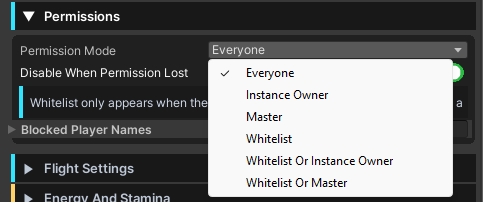
Advanced Creative Flight includes a permission system so you can control who is allowed to use flight.
You can configure flight access using:
- Everyone.
- Instance owner.
- Master.
- Whitelisted players.
- Whitelist plus owner/master modes.
- Blocked player names.
The whitelist only appears when a whitelist-based permission mode is selected, keeping the inspector clean and easy to understand.
If a player does not have permission and tries to fly, the system can deny the flight and optionally play a denied-flight sound effect. 🚫
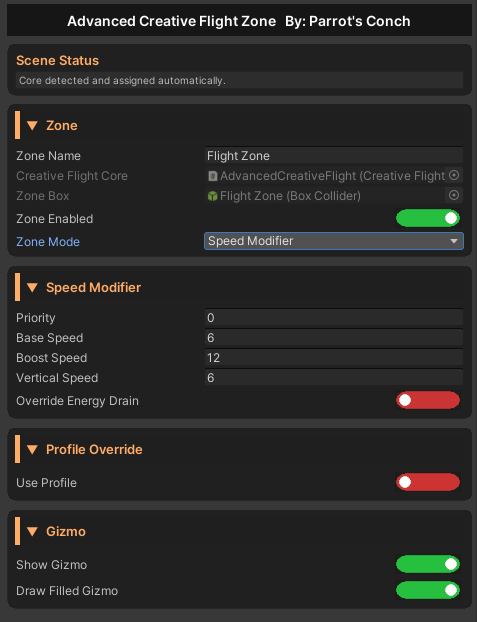
Zone system 🟩🟥🟧
Zones let you control flight behavior in specific areas of your world.
Each zone has a name identifier, and changing the zone name automatically updates the GameObject name too. This makes the scene easier to organize.
Zones can be configured with different modes:
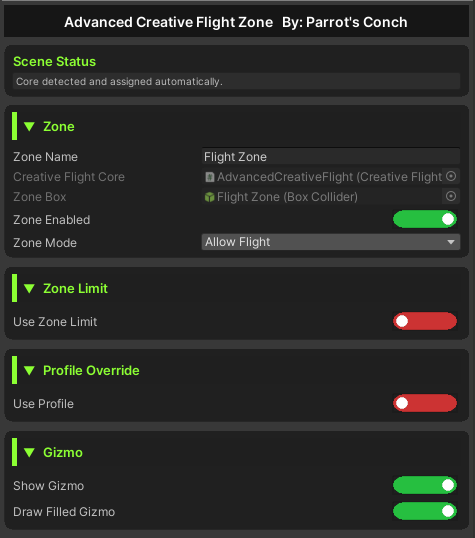
Allow Flight 🟩
Allows flight inside that zone.
You can also enable zone limits, so the player cannot escape the allowed area while flying.
Limit options include:
- Block At Limit: the player is kept inside the zone.
- Disable Flight At Limit: flight turns off when the player leaves the zone limit.
This is useful for controlled flying areas, arenas, islands, building zones, or VIP rooms.
Block Flight 🟥
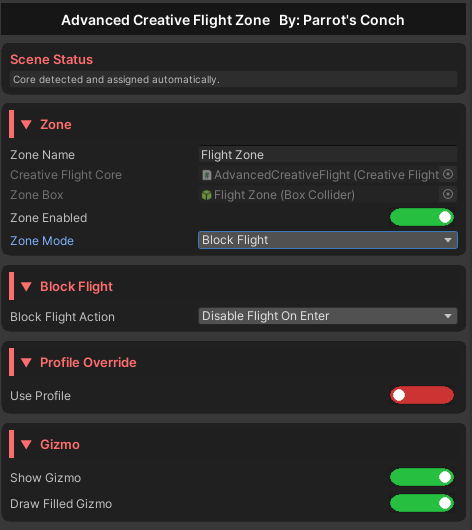
Blocks flight inside the zone.
You can configure how the zone behaves:
- Disable Flight On Enter: if the player enters while flying, flight is turned off.
- Don’t Enter If Is Flying: prevents flying players from entering that blocked zone.
This is useful for interiors, minigames, restricted areas, PvP zones, or places where flight should not be allowed.
Speed Modifier 🟧
Changes the player’s flight behavior inside the zone.
You can use this for:
- Fast tunnels.
- Slow zones.
- Low-gravity areas.
- High-energy drain zones.
- Special movement areas.
Zones can also use profiles, allowing each zone to apply a complete set of flight rules.
Energy and stamina system ⚡
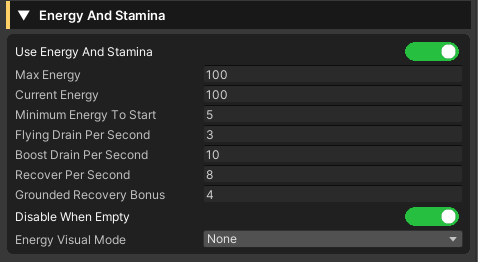
You can enable an optional energy/stamina system for flight.
This allows you to control:
- Maximum energy.
- Energy drain while flying.
- Energy drain while boosting.
- Energy recovery.
- What happens when stamina reaches zero.
You can also display current energy using:
- TextMeshPro text.
- Sliders.
- Animators.
- Multiple visual modes depending on your setup.
If stamina runs out, the system can also play a dedicated sound effect.
Flight FX 🔊✨
Advanced Creative Flight includes optional audio and particle feedback.
Audio FX
You can assign random audio clips for:
- Flight enabled.
- Flight disabled.
- Flight denied.
- Boost start.
- Boost stop.
- Stamina empty.
Audio uses PlayOneShot, and if multiple clips are assigned, one is selected randomly.
The audio source can also follow the player while flying.
Particle FX
You can assign particle roots for:
- Normal flight.
- Boost flight.
- Trail effects.
Particles can also follow the player independently from the audio system.
NoClip Assist 🧱
The system includes an optional NoClip Assist mode.
This is not a forced global noclip. Instead, it uses a controlled list of world colliders that can be collected from the scene.
The editor includes tools to:
- Collect world colliders.
- Clear collected colliders.
- Exclude VRChat pickups automatically.
- Toggle NoClip Assist with a public method.
This is useful for admin tools, testing areas, creative worlds, or controlled flying systems where you want players to pass through selected world geometry.
Debug and status tools 🧪
Advanced Creative Flight includes useful debug and status options.
You can enable:
- Status output text.
- Debug output text.
- Console logs with colored messages.
- Permission-denied warnings.
- Zone detection logs.
- Flight enabled logs showing the zone where the player started flying.
Example:
Flight enabled in 'VIP Flight Zone'.
This makes it much easier to test and configure complex worlds.
Editor tools 🎨
The included custom editors are made with the Parrot’s Conch style:
- Clean foldouts.
- Rounded dark panels.
- Color-coded sections.
- Capsule toggles.
- Tooltips.
- Create/edit/delete buttons.
- Auto-detected zones and profiles.
- Organized hierarchy under the prefab.
The system is designed to be easy to configure without needing to manually wire everything from scratch.
Public methods for buttons and events 🔘
Advanced Creative Flight includes public underscore methods that can be called from UI buttons, triggers, or other Udon systems.
Examples include:
- Enable or disable the flight system.
- Toggle flight.
- Enable or disable stamina.
- Toggle FX.
- Toggle NoClip Assist.
- Change direction mode.
- Force enable or disable flight.
This makes it easy to connect the system to your own menus, admin panels, world logic, or custom interactions.
Why use Advanced Creative Flight? 🌟
Advanced Creative Flight is made for creators who need a serious flight system, not just a simple fly script.
It gives you:
- Desktop and VR support.
- Permission control.
- Profiles.
- Zones.
- Flight limits.
- Stamina.
- Audio and particle FX.
- NoClip Assist.
- Debug tools.
- A clean custom editor.
- Drag-and-drop setup.
Just place the prefab in your world and customize it to match your experience.
Assets/ParrotsConch/Prefabs/AdvancedCreativeFlight.prefab
Advanced Creative Flight gives your VRChat world a professional, flexible, and creator-friendly flying system ready to use. 🪽🚀
🤖 AI-Assisted Content Disclaimer
This product was fully conceptualized and designed by Parrot’s Conch.
The original product idea, feature planning, permission structure, pseudocode, and core code matrix were created by the human developer behind Parrot’s Conch.
This product was developed in part with AI assistance. AI tools were used to assist with portions of coding, artwork, logos, promotional text, tutorials, documentation, and other development-related assets.
Testing, review, functionality checks, editing decisions, final configuration, product preparation, and packaging were completed by the human developer behind Parrot’s Conch.
Final files were reviewed, edited, configured, tested, and packaged by Parrot’s Conch.
Independent creator asset notice
This asset is an independent creator-made tool by Parrot’s Conch. It is not affiliated with, endorsed by, sponsored by, or officially connected to any third-party platform, company, game, or brand.