Banner Background
Smart Quick Optimizer

Smart Quick Optimizer

Product Description

https://jinxxy-c.jinxxy-cdn.com/cdn-cgi/image/format=auto/5009ff42-156d-5e49-8355-a99c8aa5539c/3928306978589246845/990799713236283392.pngWhat is it?

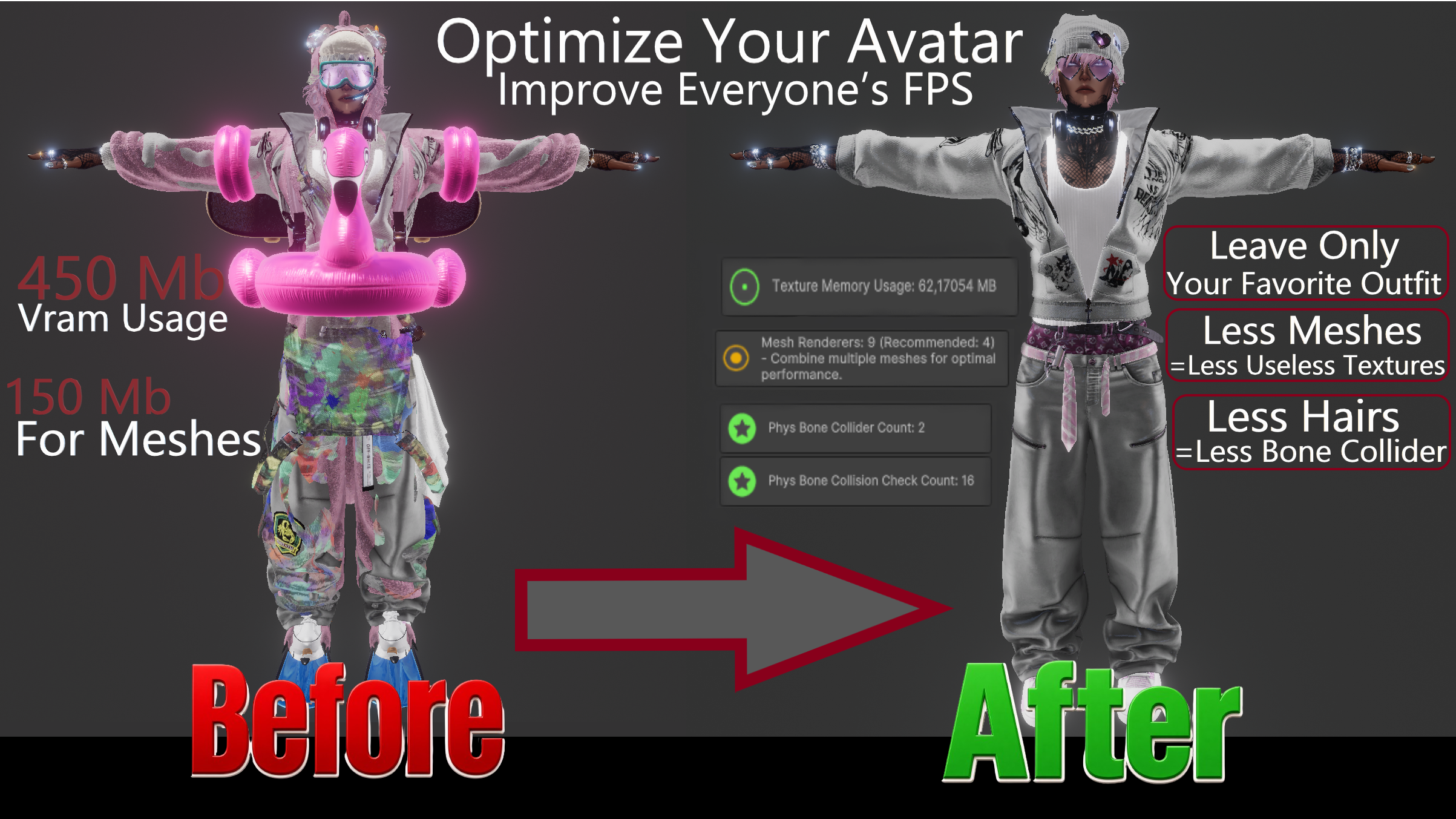
Smart Quick Optimizer was made to save you hours of work.
Got an e-boy avatar with 12 tattoo textures, 10 jacket decals, 36 outfits, and then wonder why your friends crash?
Before this tool, cleaning all that up could easily take 3–4 hours.

Now, simply keep what you actually use.
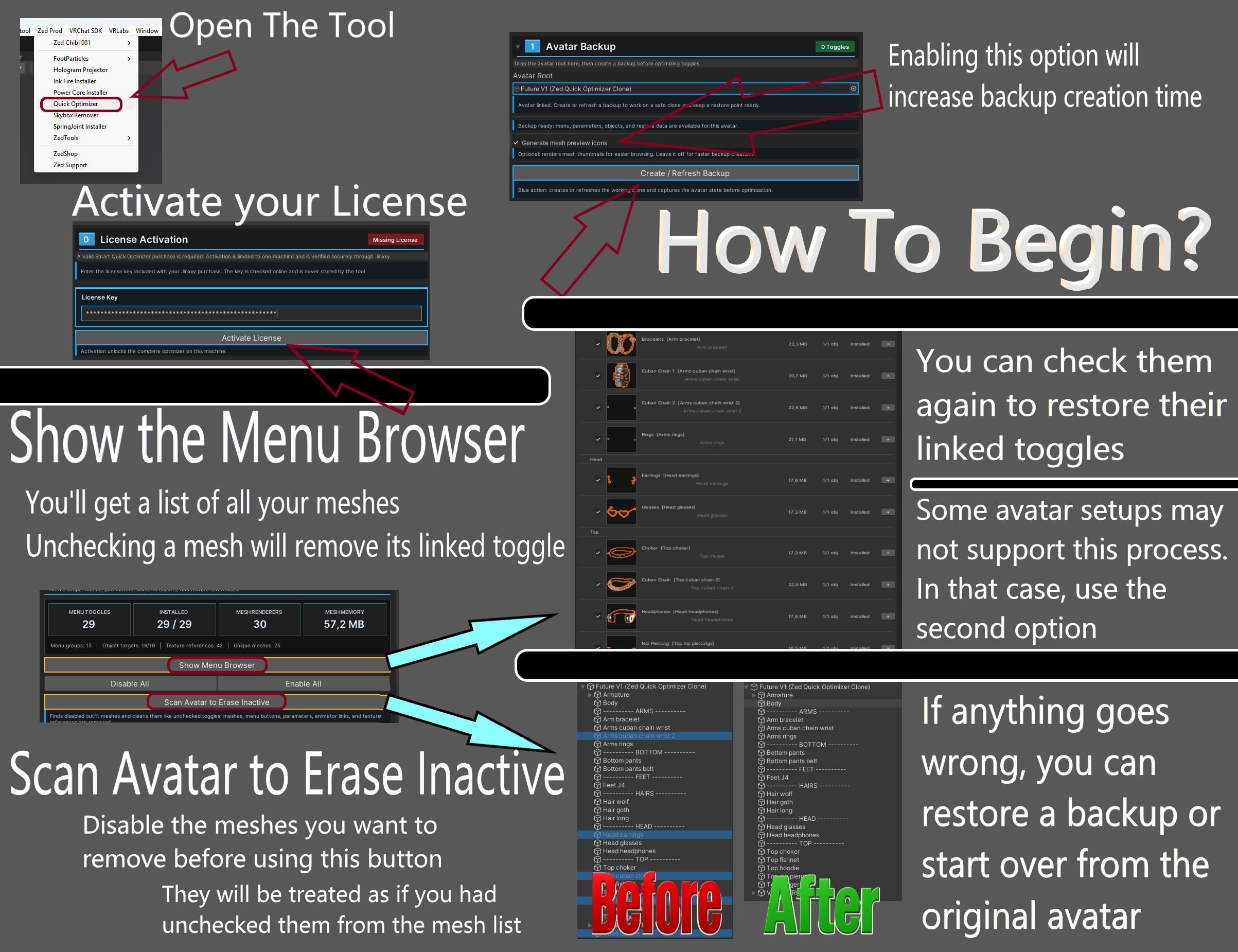
Disable unused menus, automatically remove the meshes connected to them,
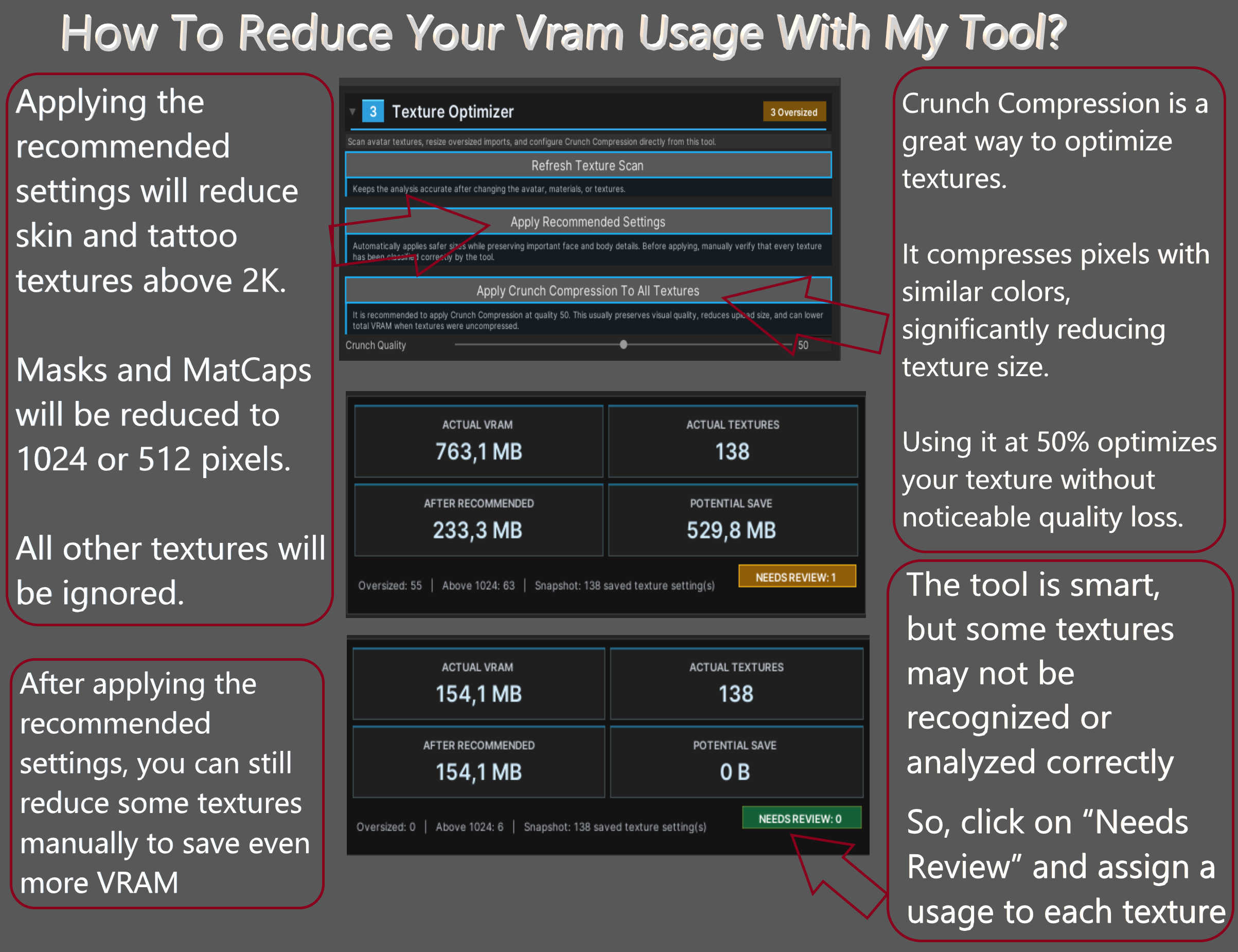
analyze your textures to find what should be optimized, and create backups and snapshots...
all in just a few clicks.

In less than 20 minutes, you can dramatically reduce your avatar's weight without spending hours inside Unity.


That's why I created this tool.

Instead of spending hours navigating your avatar hierarchy, you can simply enable or disable the parts you actually want to keep.

The tool only modifies:

  • Menus
  • Meshes connected to those menus

Your avatar's other components remain untouched.

https://jinxxy-c.jinxxy-cdn.com/cdn-cgi/image/format=auto/5009ff42-156d-5e49-8355-a99c8aa5539c/3928306978589246845/990761407347182592.pngBuild Your Avatar Your Way

Sometimes, starting over is simply faster.

Disable the menus you don't need, and every mesh connected to them will automatically disappear.

This lets you build a clean avatar from the ground up, without digging through hundreds of GameObjects.

https://jinxxy-c.jinxxy-cdn.com/cdn-cgi/image/format=auto/5009ff42-156d-5e49-8355-a99c8aa5539c/3928306978589246845/990765450464851968.pngNot sure what's making your avatar heavy?

The Texture Analyzer scans every texture used by your avatar and highlights the ones that should be optimized.

Instead of checking everything manually, you'll instantly know where your VRAM is being wasted, making optimization faster, easier, and much more accurate.

Built with Safety in Mind

Experiment with confidence.

Before making any changes, Smart Quick Optimizer can automatically create an avatar clone, while also giving you the option to create backups and snapshots whenever you need them.

Made a mistake? Simply restore a previous state and keep going.

https://jinxxy-c.jinxxy-cdn.com/cdn-cgi/image/format=auto/5009ff42-156d-5e49-8355-a99c8aa5539c/3928306978589246845/990762329448817664.pngBuying this tool also gives you access to support on my Discord server

Have a question, found a bug, or have an idea to improve the tool? I'm always happy to help and listen to your feedback.

There isn't a single bug that can't be fixed. There are only bugs that haven't been discovered yet.

If you encounter an issue, please contact me before leaving a negative review. I can't fix a problem if I don't know it exists.

I spend countless hours creating tools that are easy for beginners, while still being useful for experienced Unity users.

Every purchase, bug report, suggestion, and review helps me continue improving these tools for the VRChat community.


Please give me a chance to fix the issue before leaving a review. I'm committed to supporting every customer and continuously improving my tools.

https://jinxxy-c.jinxxy-cdn.com/cdn-cgi/image/format=auto/5009ff42-156d-5e49-8355-a99c8aa5539c/3928306978589246845/990762708350637056.pngIf you enjoy the tool, please consider leaving a review on Jinxxy.


Your review helps other creators discover my work and encourages me to keep improving the project.

https://jinxxy-c.jinxxy-cdn.com/cdn-cgi/image/format=auto/5009ff42-156d-5e49-8355-a99c8aa5539c/3928306978589246845/990763682896203776.pngSmart Quick Optimizer is still under active development and will continue to evolve over time.

I've personally tested the tool extensively on my own setup and used it on my main avatar without any issues.

However, I don't yet know how demanding some features may be on lower-end PCs, especially when processing very large avatars. For the best experience, I recommend using the tool on a system with a fast SSD and always creating a full backup of your Unity project before making major changes.

By using this tool, you acknowledge that it is still actively evolving and may require further testing.

I cannot be held responsible for any damage resulting from misuse of the tool, an incorrect project setup, or failure to create appropriate backups.


My socials :

My Guns (linktree) https://guns.lol/zedcreator

Discord https://discord.com/invite/kRubzZTXjs

Instagram https://www.instagram.com/wolfynae/

Tiktok https://www.tiktok.com/@zedprodvrchat

Ko-fi https://ko-fi.com/wolfinae

-66%$14.95$5.08
Can be purchased with Loyalty Points