
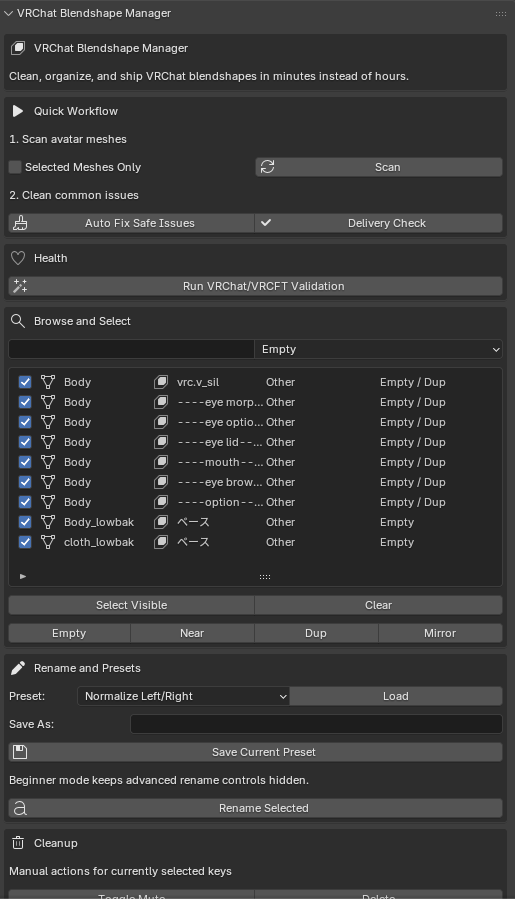
Product Description
VRChat Blendshape Manager is a Blender add-on built for avatar creators, commission artists, and VRC setup workflows.
If you are tired of digging through huge shape key lists, fixing naming messes, checking clothing sync by hand, and spending hours prepping avatars for delivery, this tool is made for you.
It helps you clean up cluttered blendshape setups, standardize naming, detect common problems, sync missing keys across avatar parts, run VRChat validation checks, and export a clean report before delivery.
This is not just a nicer shape key list. It is a production workflow tool for getting avatars ready faster with less manual cleanup.
What It Helps With
- Too many shape keys that are hard to search and manage
- Clothing, hair, and accessories missing body blendshapes
- Empty, duplicate, or near-useless keys cluttering the avatar
- Inconsistent naming across mirrored or related keys
- Slow prep time for visemes, expressions, VRCFT, and commission handoff
Features
- Unified shape key browser for multiple avatar objects
- Search and filter tools for fast cleanup
- Batch rename tools with presets
- Left and right naming normalization
- Empty and near-empty shape key detection
- Duplicate shape key detection
- Missing mirror pair detection
- Auto Fix Safe Issues workflow
- Sync missing blendshape names from active mesh to selected targets
- Optional fuzzy match suggestions for near-matching names
- VRChat and VRCFT validation checks
- Commission Delivery Check summary
- TXT and JSON report export
- Beginner-friendly workflow with quick action buttons
- Saved rename presets
- Add-on preferences for workflow tuning
Best For
- VRChat avatar creators
- Commission artists
- VRCFT setup artists
- Avatar sellers preparing polished releases
- Anyone managing large facial and clothing blendshape sets in Blender
Workflow
- Scan your avatar meshes
- Auto-fix safe cleanup issues
- Validate VRChat and VRCFT readiness
- Check missing keys across clothes, hair, and accessories
- Export a final report before delivery
Requirements
- Blender 3.0 or newer
Installation
- Download the zip
- Open Blender
- Go to Edit > Preferences > Add-ons > Install
- Select the addon zip
- Enable VRChat Blendshape Manager
Notes
- Built for Blender workflow
- Designed around VRChat avatar production
- Best used with avatars that already contain shape keys on the body mesh
Copyright © 2026 erutluZ.