
Product Description
Stop checking two avatar versions by hand.
VRChat Avatar Variant Diff is a Blender tool built for VRChat creators, commissioners, and avatar sellers who need to compare two avatar variants fast and clearly.
Whether you are checking:
- PC vs Quest
- before vs after optimization
- source vs edited version
- base avatar vs commission delivery version
this tool helps you catch differences before they become mistakes.
What It Does
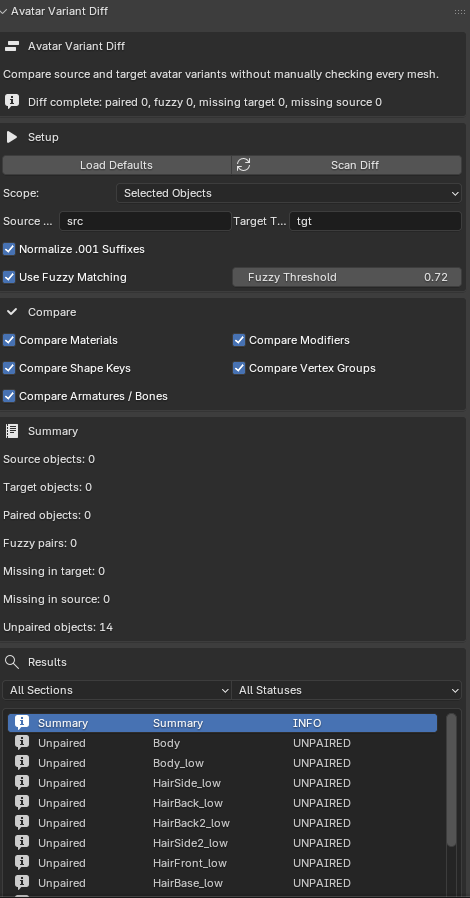
- Compare two avatar variants inside Blender
- Match objects using src / tgt naming or fuzzy pairing
- Detect missing objects in either version
- Compare materials
- Compare modifiers
- Compare shape keys
- Compare vertex groups
- Compare armatures and bone names
- Export a clear TXT or JSON diff report
Why It’s Useful
Manually checking two large avatar files is slow, repetitive, and easy to get wrong.
This tool helps you quickly answer questions like:
- Did I lose any outfit pieces?
- Did a mesh change materials?
- Are shape keys missing in one version?
- Did bone names or armatures change?
- Did one version lose important vertex groups?
- Which objects failed to pair cleanly?
Best For
- VRChat avatar creators
- Commission artists
- Outfit converters
- Variant creators
- Anyone maintaining multiple avatar versions
Core Features
- Source / Target comparison workflow
- Fuzzy matching for similar object names
- Armature and bone diff checks
- Filter results by section and status
- Exportable reports for QA or delivery review
- Built directly for Blender workflow
Typical Use Cases
- Compare a finished commission against the base avatar
- Verify Quest conversion changes
- Check optimization edits before release
- Audit outfit variant differences
- Confirm delivery files match what you intended to send
Included in v0.2
- Object pairing
- Fuzzy pair matching
- Material diff
- Modifier diff
- Shape key diff
- Vertex group diff
- Armature / bone diff
- Filtered result browser
- TXT / JSON export
Requirements
- Blender 3.0 or newer
Installation
- Download the zip
- Open Blender
- Go to Edit > Preferences > Add-ons > Install
- Select the addon zip
- Enable VRChat Avatar Variant Diff
Notes
- Designed for Blender
- Works best when your two variants use consistent naming like Body_src and Body_tgt
- Fuzzy matching helps when names are close but not identical
Copyright © 2026 erutluZ.