Product Description
Like the audio trolling tools included in The OCDemon avatar? Want to add them to any avatar? Now you have an easy (and free!) way to do it, simply drag and drop the included prefab onto your avatar, and you're done*! This prefab installs a new menu on your avatar called "Tools" (more tools coming in the future that will use the same sub-menu) and adds the ability to play sounds from your avatar.
- *Requires VRCFury
- Uses 1 INT parameter
- Uses 1 audio source
- PC Only
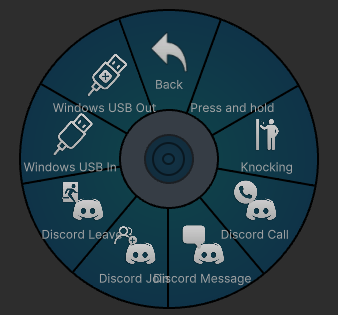
Includes the following sound effects:
- Binaural knocking sound (super realistic)
- Discord Incoming Call
- Discord Join Channel
- Discord Leave Channel
- Discord DM
- Windows Device/USB Connected
- Windows Device/USB Disconnected
Installation Instructions
- Import VRCFury to your avatar project (if not already imported)
- Navigate to "_apoc/Prefabs"
- Left-click to select "Trolling SFX" and drag it onto the root of your avatar
- (Optional) If you wish to change the menu location, select the "Trolling SFX" prefab after dropping it on your avatar, and change the menu path under "Full controller", and both "Override Menu Icon" VRCFury objects, and change them to your desired menu path. Future tools I release will use the same path and icon, and will automatically install under the same sub-menu by default.
Navigate to the menu, then press and hold your selection to play a sound.
Want to add more sounds?
It's simple to do if you have a bit more Unity experience, by editing the included FX controller and menu to add more using the provided format. All sounds use the same animation (Trolling_SFX_Play) and Audio Source, you only need to copy/paste the previous entry in the FX controller, update the parameter number (by default, it stops at 7, but you can add up to 255) for entry and exit conditions, and then edit the "Clip" portion of the (VRC Animator Play Audio) object to select which audio clip you want to play, then add the relevant trigger to the menu as desired.
Allowed
- Edits for personal use
- Uploading privately or publicly to any avatar on your VRChat account
- Use in content creation (VTubing, YouTube, TikTok, other social media, etc.)
- Redistribution in part or as a whole in commercial avatar projects, so long as I am credited
Not Allowed
- Redistribution/sharing that is not part of an avatar project, or without crediting me
- Claiming this as your own work
- Using this asset in any way that violates VRChat TOS
Need help? Want to report a bug?
Join my Discord server: https://discord.gg/xgaAm9WjgE
Join My VRC Group!
Check out my Avatar World!
https://vrchat.com/home/world/wrld_4f88eb43-1663-40cc-9652-050c482b01fe