
![A Familiar Lizard [VRChat Plush]](https://jinxxy-c.jinxxy-cdn.com/cdn-cgi/image/format=auto,onerror=redirect/4fe46dc7-7fea-5dba-a9e6-720df68db1f0/3855992522136356487/954823319902147584.png)
![A Familiar Lizard [VRChat Plush]](https://jinxxy-c.jinxxy-cdn.com/cdn-cgi/image/format=auto,onerror=redirect/4fe46dc7-7fea-5dba-a9e6-720df68db1f0/3855992522136356487/954823322841696256.png)
![A Familiar Lizard [VRChat Plush]](https://jinxxy-c.jinxxy-cdn.com/cdn-cgi/image/format=auto,onerror=redirect/4fe46dc7-7fea-5dba-a9e6-720df68db1f0/3855992522136356487/954825617433936896.png)
![A Familiar Lizard [VRChat Plush]](https://jinxxy-c.jinxxy-cdn.com/cdn-cgi/image/format=auto,onerror=redirect/4fe46dc7-7fea-5dba-a9e6-720df68db1f0/3855992522136356487/954891050368288768.gif)
A Familiar Lizard [VRChat Plush]
Product Description
"Weh? weh weh, WEH!!! WEH WEEEEH!!!! Weh weehh~"
BEHOLD!! A very squish-able Lizard Plush for VRChat!
Heavily inspired and referenced from the Lizard Plush from the game SpaceStation14
DEPENDENCIES
This asset REQUIRES VRCFury
The Materials are made with Poiyomi 9.0+
OTHER INFO
Triangle Count: 5120
This is NOT a Avatar. This is a cute prop to bring with you on your adventures.
Installation:
To easily add this lizard to your avatar, you will need VRCFury
1. Add VRCFury to your VRChay Creator companion project.
2. Open your avatar project and Import The Lizard
3. Drag and Drop the Lizard Prefab to any desired bone. [Recommend Right or left hand]
4. Scale and position the plush as desired.
5. You are done :3
You can attempt to add the lizard without VRCFury,
but you will have to make custom animations, and name paths for every avatar and avatar bone.
[Good luck❤]
Materials?
Photoshop? YES✅
Substance painter? NO🚫
You are given a .psd [photoshop file]
This is so you can edit and change the texture with a good template.
FEATURES!
This Plush Lizard, when grabbed- makes NOISES
By default, they make a "weh" noise.
This noise can be switched out by swapping out the sound file in the AUDIO object if desired.
Armature
This plush comes with a full Armature,
Arms, legs, chest, neck and all. The Armature is equipped with Physbones-
Allowing you to grab, squish, pull and deform the plushy in a semi-realistic funny way.
[Grabbing the bones also plays a noise]
Avatar Proximity Contacts
The plush also has proximity contacts, that don't take up parameter memory.
The proximity contacts allow you to "Pat/Poke/Squish" the plush.
World Placement.
You can place this plush around the world [will de-sync for others overtime]
HueSlider
Yay rainbow!🌈
Scale Slider
Make the Lizard MASSSSSSIVVEE!!!! [Perhaps too Massive...]
Blendshapes
Lizard has 39 blend shapes.
These blendshapes include but are not limited too:
- Gesture/Emotion options
- Cool Glasses
- EPIC MOHAWK HAIRCUT! [or just bald]
- Custom body proportions 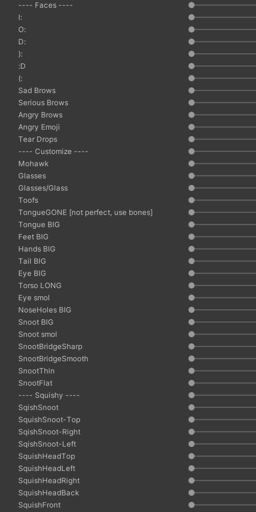
TOS
✅You are allowed to:
• Use for personal use.
• Use in and out of VRChat.
• Change the Textures and Model for personal use and commissions. [so long as all parties own the asset]
• Use on public avatars. [So long as you follow the TOS of all parties]
🛑You are NOT allowed to:
• Claim this asset as your own.
• Make variants of this asset to sell.
• Redistribution/Sharing of this asset with those who don't own it themselves.
• Use for commercial use.